Bad luminaire data kills projects. Designers specify fixtures based on incomplete specs, installations fail to meet performance targets, and budgets blow out when reality doesn’t match the datasheet.
At OpenLumen, we’ve seen how luminaire data verification prevents these costly mistakes. When you verify your data before designing, you catch problems early and build systems that actually work.
Why Inaccurate Luminaire Data Breaks Real Projects
Inaccurate photometric data doesn’t just create minor discrepancies on paper-it causes installations to fail in ways that cost time and money. When a designer relies on incomplete or outdated luminaire specifications, the resulting system underperforms or overshoots requirements. A corridor that should have 150 lux ends up with 110 lux because the manufacturer’s data omitted the effects of nearby walls and ceilings on light distribution. A parking lot designed for uniform coverage develops dark zones because the fixture’s actual beam spread differs from the datasheet. These failures happen regularly when teams skip verification and trust oversimplified photometric information.
Real Performance Gaps Between Spec and Reality
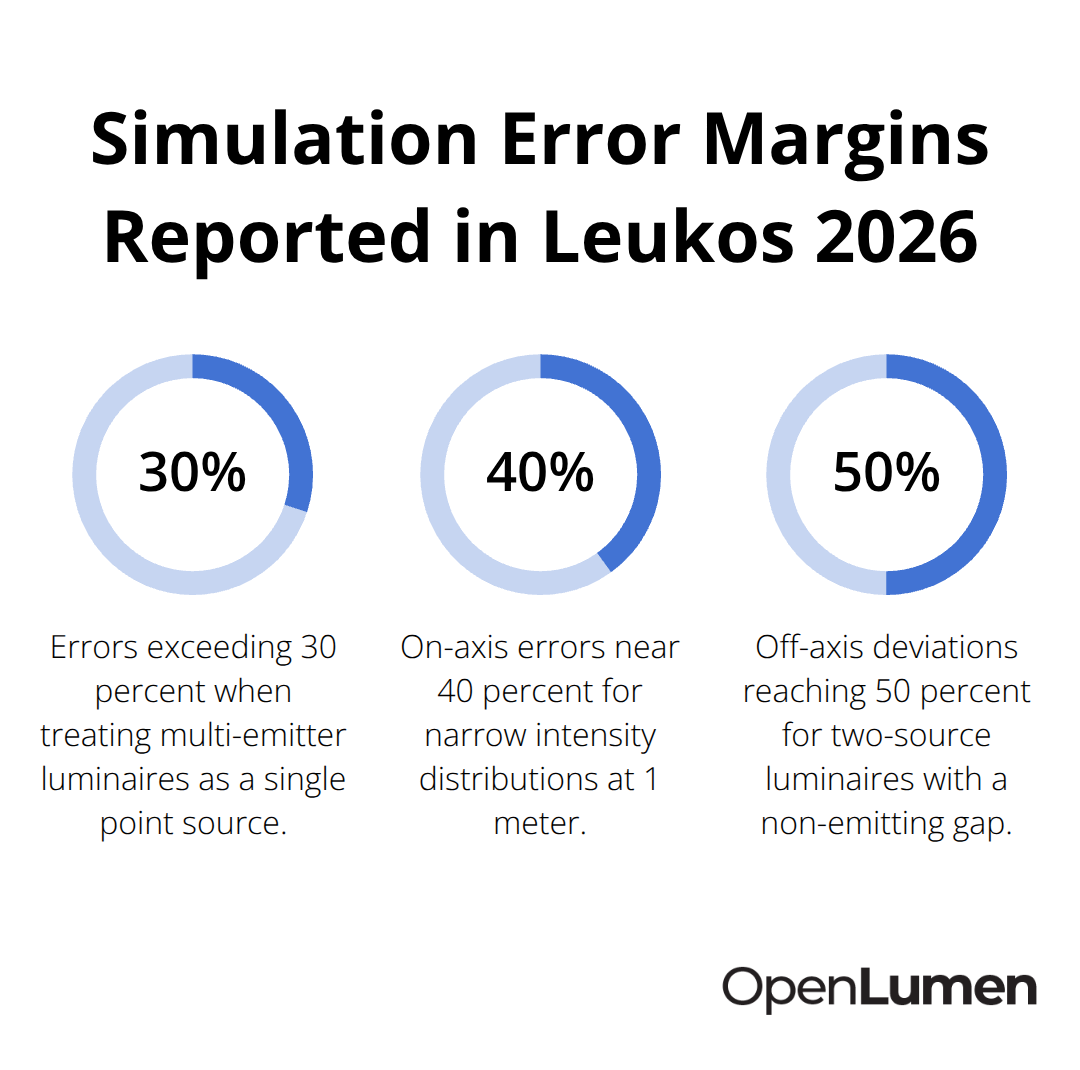
Manufacturers publish photometric data under controlled laboratory conditions that often don’t reflect how luminaires behave in actual spaces. Research by Mokran et al. in Leukos 2026 found that luminaires with spatially separated emitting areas produce simulation errors exceeding 30 percent when using traditional photometric data that treats the fixture as a single point source. A two-source luminaire with a non-emitting gap showed on-axis errors near 40 percent for narrow light intensity distributions at 1 meter, with off-axis deviations reaching 50 percent. These margins prove unacceptable.
A designer using such data specifies far too many fixtures or far too few-neither outcome acceptable to a client or building code inspector.
Standard photometric formats like Eulumdat and IES files oversimplify complex geometries, causing near-field inaccuracies that compound across an entire project. The closer the luminaire sits to the measurement surface (common in offices, retail spaces, and task lighting), the worse these errors become. A fixture that appears to deliver 500 lux at 1 meter in the datasheet may actually deliver 350 lux in your space because the photometric file ignored how the fixture’s geometry affects light distribution in near-field conditions.
Timeline and Budget Impact of Data Problems
When photometric data proves wrong after installation begins, projects stall. Contractors remove and reinstall fixtures, electrical work gets redone, and schedules slip by weeks. A property owner expecting completion in 90 days faces delays extending into 120 or 150 days because the lighting design failed verification. Material costs spike when additional fixtures must be purchased to compensate for underperforming data. Change orders pile up, and relationships between designers, contractors, and clients deteriorate.
The root cause-unverified luminaire data-could have been caught before a single fixture was ordered. Verification also protects your reputation. Designers who consistently deliver projects that meet performance targets build trust and attract repeat business. Those whose designs underperform develop a track record of failure, regardless of how thorough their design process appeared.
Why Verification Matters Before You Design
Verified data forms the foundation that separates reliable professionals from those who cut corners and hope specifications hold up. When you verify luminaire performance against real-world conditions before specifying fixtures, you catch problems early and prevent costly rework. The next section shows you exactly how to verify your data and identify which sources you can trust.
How to Verify Luminaire Data in Practice
Source Your Data From Accredited Test Labs
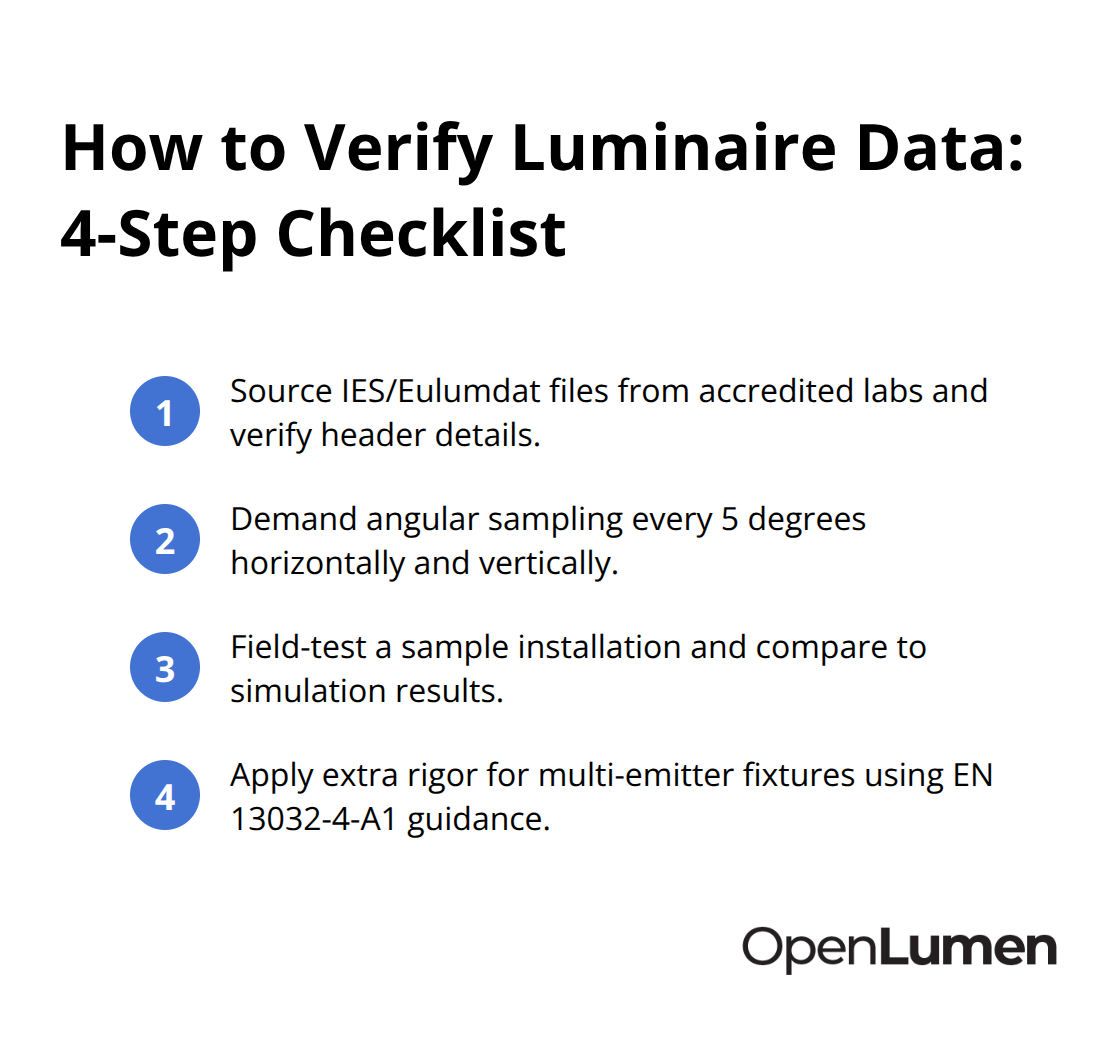
Pull the photometric file directly from the manufacturer’s test lab, not from a distributor’s website or a sales rep’s email. Manufacturers must provide IES or Eulumdat files generated by accredited testing facilities that follow standards like EN 13032-1 or IES LM-79. Check the file header for the test date, test lab name, and the luminaire model number-these details confirm the data matches your actual fixture.
If a manufacturer won’t provide a photometric file or only offers a PDF spec sheet with a single candela value, that’s a red flag.
Incomplete data invites the exact performance gaps that derail projects. The DOE’s LED Lighting Facts program, which ran from 2009 to 2018, listed over 70,000 LED products with verified performance data from independent test labs. Although the program ended, the historical dataset remains valuable for benchmarking older fixtures and understanding how manufacturers’ claims have evolved. For current products, check whether test labs like Intertek or TÜV Rheinland have verified the luminaire’s photometric output. These labs publish test reports that include detailed angular sampling and spectral data-far more granular than manufacturer summaries.
Demand Sufficient Angular Sampling Density
If the manufacturer’s datasheet lacks angular sampling density or only shows data along two horizontal planes, request a full photometric file with measurements at least every 5 degrees vertically and horizontally. Limited sampling causes interpolation errors that inflate corner accuracies and underestimate real-world performance, especially in near-field conditions within 2.5 meters of the fixture. Research by Mokran et al. in Leukos 2026 found that luminaires with spatially separated emitting areas produce simulation errors exceeding 30 percent when traditional photometric data treats the fixture as a single point source.
A two-source luminaire with a non-emitting gap showed on-axis errors near 40 percent for narrow light intensity distributions at 1 meter, with off-axis deviations reaching 50 percent. These margins prove unacceptable. Standard photometric formats like Eulumdat and IES files oversimplify complex geometries, causing near-field inaccuracies that compound across an entire project. The closer the luminaire sits to the measurement surface (common in offices, retail spaces, and task lighting), the worse these errors become.
Test Data Against Real Installation Conditions
Validate photometric data against actual installation conditions before specifying fixtures across an entire project. Install a sample luminaire in a representative space-a test corridor, parking area, or retail zone-and measure illuminance at multiple points using a calibrated lux meter. Compare your measurements directly to what the photometric simulation predicted using software that applies the manufacturer’s IES data. Research by Mokran et al. in Leukos 2026 showed that at 2.5 meters from a luminaire, simulation software like Dialux EVO deviates from calculated illuminance by roughly 1 percent, a distance common in offices and classrooms.
If your field measurements align within 5 to 10 percent of the simulation, the photometric data is reliable for that space type. If deviations exceed 15 percent, the luminaire’s geometry or the photometric file’s angular sampling is insufficient for your application. Document your verification process, including the reflectance values you used for walls and ceilings, the specific Radiance or Dialux settings, and the measurement equipment. This documentation protects your credibility and helps future projects benefit from what you’ve learned.
Handle Multi-Emitter Luminaires With Extra Rigor
When verifying multi-emitter luminaires like linear fixtures with separated light sources, demand photometric data measured at distances specified by EN 13032-4-A1, which requires testing at l = 15·D + S_m to capture near-field effects accurately. Standard point-source assumptions fail for these fixtures, producing errors exceeding 30 percent in near-field zones. Insist on photometric files that model luminaires as discrete emitting zones rather than single points, or run physical tests yourself before committing to a design.
This rigor separates designers who deliver projects on time and on budget from those who face costly rework. Once you’ve verified your luminaire data and confirmed it matches real-world conditions, you can move forward with confidence-but common data problems still lurk in the industry, and knowing how to spot them protects every project you design.
What Data Problems Kill Lighting Projects
Designers face three persistent data problems that consistently derail projects: photometric files that don’t match current fixtures, manufacturer reporting that varies wildly across product lines, and missing performance metrics that building codes now require. These problems aren’t theoretical-they cost money and delay installations.
Outdated Photometric Information Breaks Specifications
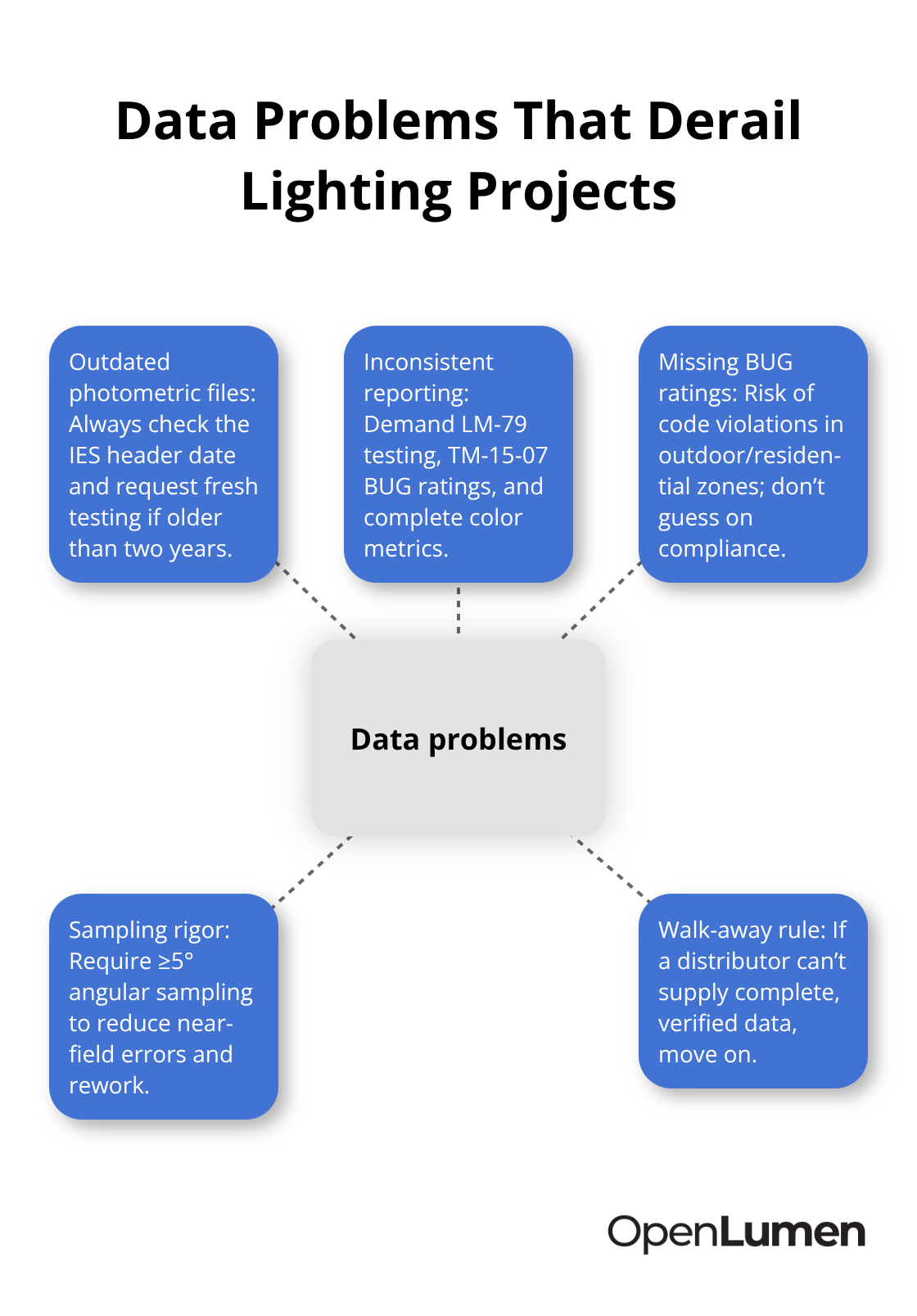
Outdated photometric information remains the most common culprit. A manufacturer updates a luminaire’s internal geometry or LED source but publishes the old photometric file for months or years, leaving designers with data that no longer reflects the actual product. You specify 40 fixtures based on 2023 data, the contractor receives 2025 units with different optics, and suddenly your illuminance calculations are off by 15 to 20 percent.
Checking the test date on the IES file header prevents this trap, but most designers never look. If the photometric data is more than two years old, request fresh testing from the manufacturer’s lab. Many won’t provide it without resistance, which signals they’re cutting corners on product consistency.
Inconsistent Reporting Across Manufacturers Creates Confusion
Inconsistent reporting across manufacturers creates a second nightmare. One manufacturer reports BUG ratings (backlight, uplight, glare) according to IES TM-15-07 standards, another provides only candela values and ignores glare entirely, and a third publishes spectral data without stating the measurement distance or ambient conditions. You can’t compare fixtures objectively when each company reports different metrics.
The industry standard exists-IES LM-79 for photometric testing and IES TM-15-07 for BUG ratings-but compliance remains voluntary, and manufacturers know most designers won’t demand full compliance. Insist on complete data: photometric files with angular sampling every 5 degrees or finer, BUG ratings for outdoor fixtures, color metrics like correlated color temperature and color rendering index, and lumen maintenance data showing how brightness decays over 25,000 to 50,000 hours. If a distributor can’t provide these specifics, walk away.
Missing BUG Ratings Expose You to Code Violations
Missing BUG ratings expose you to liability in outdoor and architectural applications. Building codes increasingly reference IES TM-15-07 for glare and spill light compliance, particularly in parking areas and residential zones. A fixture without published BUG data means you’re guessing whether it meets code, and inspectors won’t accept guesses.
The DOE’s LED Lighting Facts program, which ended in 2018, demonstrated that verified, standardized reporting is possible and valuable-over 70,000 products were listed with consistent, independent test lab verification. That program’s absence leaves a gap; manufacturers now compete on claims rather than transparent data, and designers bear the cost of sorting through incomplete specifications.
Final Thoughts
Verified luminaire data forms the only foundation that separates successful lighting projects from costly failures. When you source photometric files from accredited test labs, demand sufficient angular sampling, validate data against real installation conditions, and handle multi-emitter luminaires with appropriate rigor, you eliminate the guesswork that derails timelines and budgets. The three persistent data problems-outdated photometric information, inconsistent manufacturer reporting, and missing performance metrics-won’t disappear without active intervention from designers and contractors who refuse to accept incomplete specifications.
Community verification accelerates progress across the entire industry. When designers, contractors, and facility owners share their real-world measurement results and flag which luminaires perform as advertised, everyone benefits from transparent, trustworthy data. Platforms that maintain community-verified luminaire libraries and provide instant access to photometric metrics including polar charts, BUG ratings, and zonal lumens reduce the friction of luminaire data verification and let you compare fixtures objectively using consistent metrics.
Treat luminaire data verification as a non-negotiable part of your design process moving forward. Your projects will deliver results that match specifications, your clients will trust your work, and your reputation will reflect the rigor you bring to every decision. Explore OpenLumen to see how community-verified luminaire data and real-time photometric analysis can streamline your next project.
The information provided is for general educational purposes only and should not be considered professional engineering or lighting design advice. Always verify project requirements, local codes, and specifications with qualified professionals before making final decisions.